
Across all tool calls, which tool kinds account for the most total effective time — separately for Claude Code and Codex?
Across all tool calls, which tool kinds account for the most total effective time — separately for Claude Code and Codex?
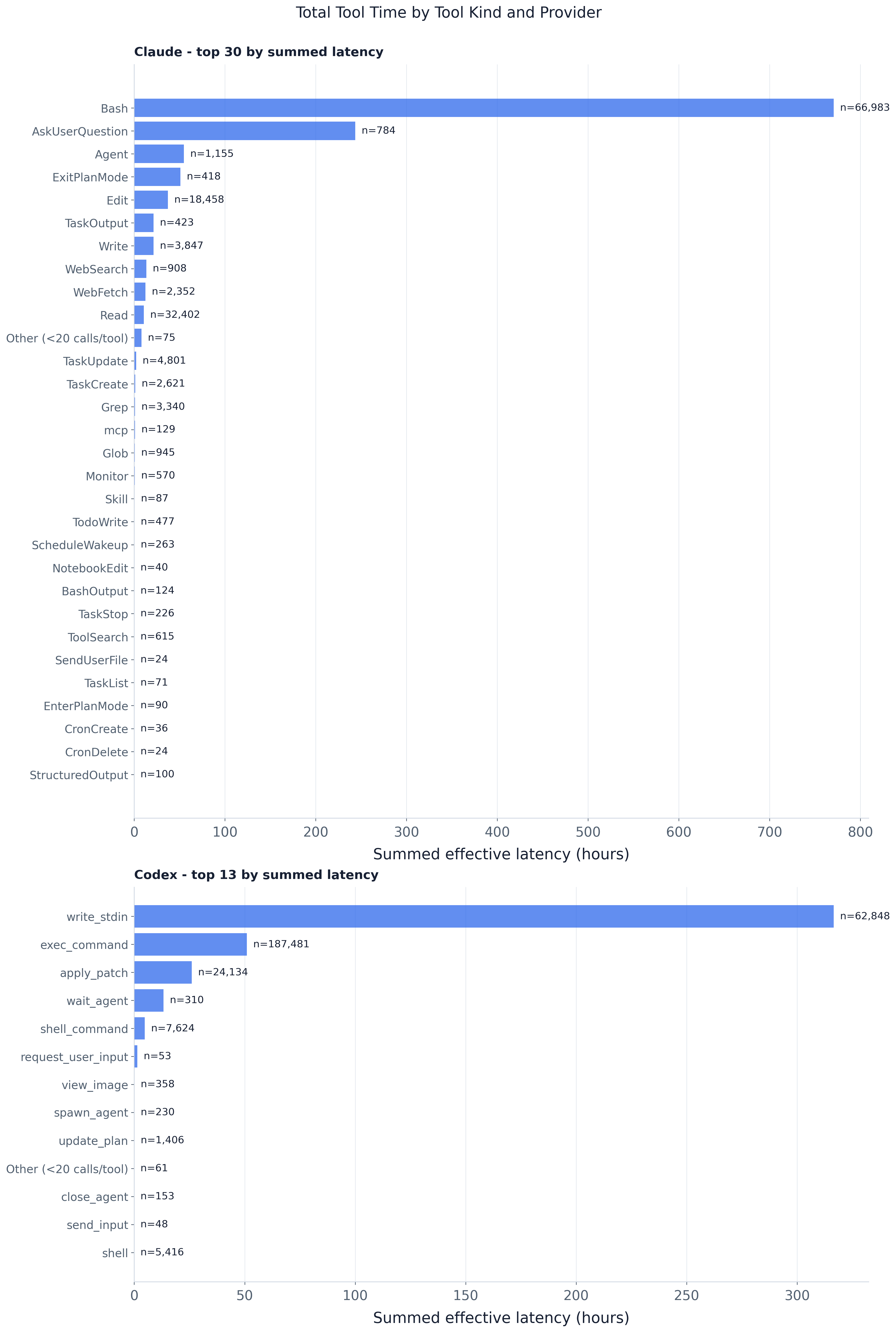
Aggregate tool-execution time is dominated by a handful of tool kinds rather than spread across the
vocabulary. The ranking is by summed latency (with n= call counts annotated), which separates
two routes to the top: being called constantly versus being individually slow. Claude’s Bash
leads everything at ~1,247h over 159k calls — high volume and a long tail —
followed by Claude’s AskUserQuestion at ~664h and Codex’s write_stdin at ~425h. The next bars
expose the slow-but-rare regime: ExitPlanMode totals ~239h over 672 calls and Agent ~80h over
2,546 calls. By contrast Codex’s exec_command, the single most-called tool at 252k calls, totals
~72h
because each call is cheap. Because latency is additive over parallel calls these are attributed
work, not wall-clock session time; the CSV (latency_share, avg_latency_ms) has the exact
figures, including the tail collapsed into Other.
Every agent step in the trace carries a tools[] list of tool calls, each with a measured latency.
This experiment attributes that latency to tool kinds and asks where the aggregate tool-execution
time goes, rendering one horizontal-bar panel per provider with tools ordered by summed latency
(each bar annotated with its call count n).
Method and assumptions:
tool_internal_latency_ms if present, else tool_wall_latency_ms
(the shared trace_db.EFFECTIVE_TOOL_LATENCY_MS_SQL precedence; the legacy latency_ms field is
not in the normalized data). Only strictly positive latencies contribute to a tool’s
summed/averaged time; calls with no effective latency are counted as missing_latency_calls.tool_calls (the UNNESTed tools[]), not agent steps.mcp_ is aliased to a
single mcp bucket; the long server-qualified names are individually rare. The CSV keeps the raw
unaliased names.--min-tool-calls-for-plot
provider-local calls (default 20) are summed into one Other (<N calls/tool) bar. The CSV keeps
full per-tool detail — nothing is dropped from the data, only from the plot.plot.py is a thin query→shape→plot pipeline over the shared trace DuckDB:
_tool_time_query(plot_name_expr, *, by_provider) — the shared aggregation: normalizes the tool
name (blank/NULL → <unknown-tool>), applies the effective-latency precedence, and emits
per-bucket calls, latency_count, missing_latency, error_calls, latency_sum, plus a
first-appearance first_seen ordinal for a deterministic tie-break. plot_name_expr selects the
raw name (CSV) or the mcp_*→mcp alias (figure); by_provider adds the rounds.provider join.load_tool_time(con) — global {tool_name: ToolTimeStats} for the CSV (raw names, no collapsing).load_tool_time_by_provider(con, *, min_calls) — per-provider stats with the MCP merge done in
SQL and the rare-tool collapse in Python (summing is order-independent).plot_tool_total_time_by_kind(...) — the per-provider summed-latency panels.write_tool_total_time_by_kind(...) — the full-detail CSV.main() — wires the standard trace_db CLI (--db | -i/--input | -o/--output-dir) to the
above and embeds the self-contained PNG sidecar.ToolTimeStats ties are broken by first_seen (min global call ordinal) so output is stable across
DB builds — GROUP BY order is not. The data layer (parsing, surrogate keys, schema) lives in
artifacts/utils/trace_db.py; see artifacts/utils/DB_SCHEMA.md.
# default merged trace, output next to this README
uv run python artifacts/tool_calls/tool_time_by_kind/plot.py

# a specific trace (materialized to a temp DuckDB cache on first use)
uv run python artifacts/tool_calls/tool_time_by_kind/plot.py -i trace/sample.jsonl

# a prebuilt DB (run_all.py's build-db step passes this), into a chosen dir
uv run python artifacts/tool_calls/tool_time_by_kind/plot.py --db "$TMPDIR/trace.duckdb" -o "$TMPDIR/out"
Useful flags: --top-tools (max bars per panel, default 30), --min-tool-calls-for-plot
(rare-tool collapse threshold, default 20).
Written to -o (default this folder):
tool_total_time_by_kind.png — provider-paneled total effective time per tool kind.tool_total_time_by_kind.csv — full per-tool totals: tool_calls, valid_latency_calls,
missing_latency_calls, error_calls, total_latency_ms/_s/_hours, latency_share,
avg_latency_ms.The PNG is self-contained — it embeds this README, the CSV, and the plotting code. Unpack with
uv run python artifacts/utils/png_sidecar.py extract <png>.